
Hybrider Lernraum > Touchscreenübersicht

Seminarraum für hybrides Lehren und Lernen
Touchscreenübersicht

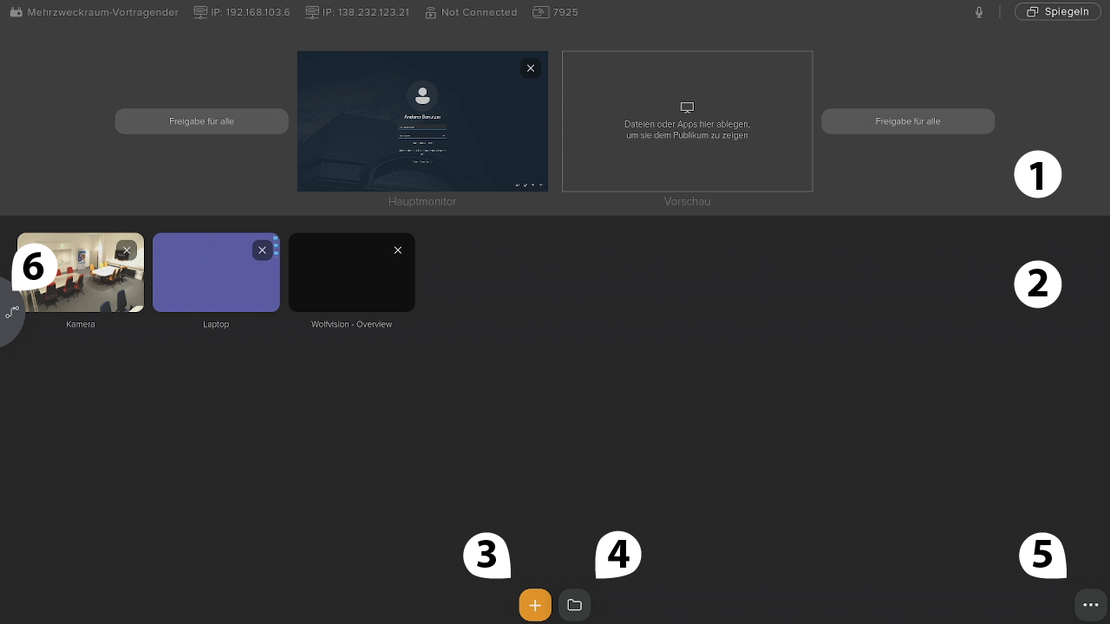
Auf dieser Seite erhalten Sie einen Überblick über die Funktionen, die über das Touchscreen-Panel im Hybriden Lernraum verfügbar sind. Durch diese Übersicht sollten Sie in der Lage sein, den Raum in Betrieb zu nehmen und zu bedienen.
1 - Bildschirmbereich
Nach dem Start sehen Sie im oberen Bereich zwei große Vorschaufenster:
Hauptmonitor
Zeigt live die Inhalte, die aktuell auf dem großen Bildschirm im Raum ausgegeben werden.
Vorschau
Zeigt Inhalte, die vorbereitet, aber noch nicht live übertragen werden.
2 - Quellenbereich
Alle geöffneten oder geladenen Quellen erscheinen automatisch auf der Startseite in der unteren Hälfte des Bildschirms als kleine Kacheln. Von dort aus können Sie per Drag-and-Drop auf den Hauptmonitor oder auf die Vorschau verteilt werden.

3 - Quelle hinzufügen

Beim Tippen auf das orange Plus unten in der Mitte des Bildschirms erscheinen folgende auswählbare Ressourcen:
- PC – erscheint nur, wenn ein Laptop angeschlossen ist.
- Browser – öffnet einen integrierten Webbrowser direkt auf dem Touch-Panel.
- Whiteboard – öffnet ein digitales Whiteboard für Zeichnungen, Notizen, usw.
- Kamera – zeigt das Live-Bild der Raumkamera.
![[+]_Menu_Sources_Detail](/media/filer_public_thumbnails/filer_public/7d/1a/7d1abbf8-a71e-44d3-adb6-a85e6f5f2d05/menu-sources-detail.jpg__900x205_q85_crop_subsampling-2.jpg.webp)
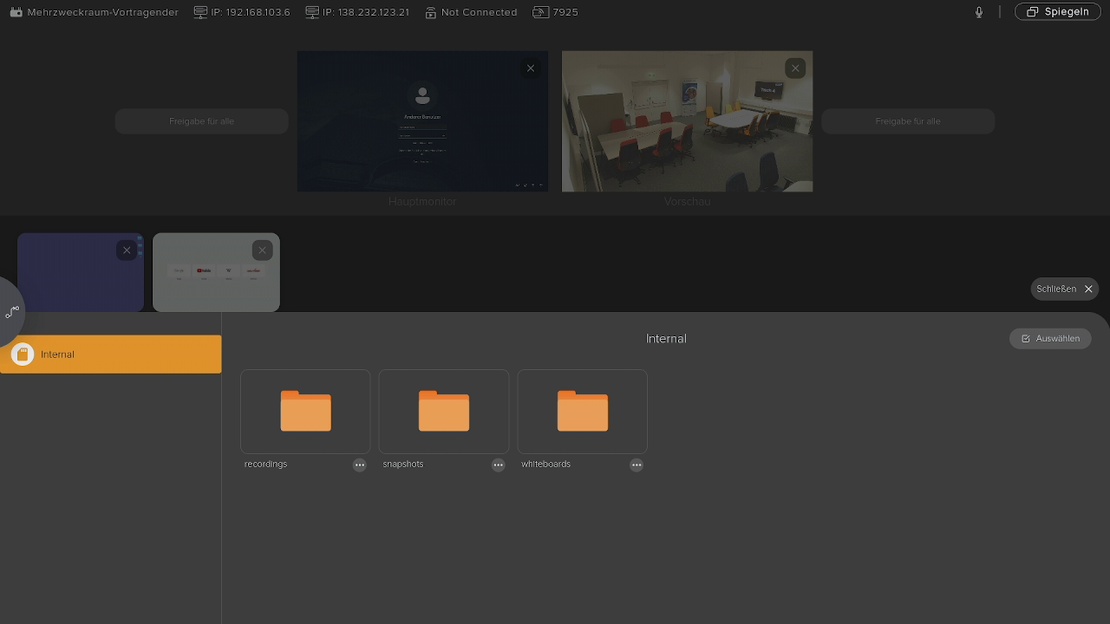
4 - Dateien laden

Beim Öffnen erscheinen links die Speicherorte:
- Internal (interner Speicher des Systems)
- USB-Stick, falls angeschlossen
Im Speicherort Internal befinden sich folgende Ordner:
- Recordings – lokale Aufzeichnungen
- Snapshots – Bildschirmfotos und Kamerasnapshots
- Whiteboard – gespeicherte Whiteboard-Dateien
Hier können Sie Dokumente auswählen und in das System laden, um sie anschließend auf die Monitore zu übertragen oder in BigBlueButton zu verwenden.

Dateien laden
Dateien laden Menu
5 - Erweitertes Menü

Beim Tippen erscheinen folgende Optionen:

Besprechung starten/beitreten
- Öffnet das BigBlueButton-Meeting „Mehrzweckraum“.
- Das Panel fungiert dann wie ein Moderator/Teilnehmer in der Webkonferenz.
Raum-Controller
- Steuert die Raumkamera (Winkel, Zoom, Perspektive)
Keyboard-Icon
- Öffnet eine Bildschirmtastatur direkt auf dem Touch-Panel.
Menü-Rad (Einstellungen)
- Hier sind erweiterte Systemeinstellungen zu finden, die nur für die Systemadministrator:innen relevant sind.
Deckenmikrofon stummschalten
- Aktiviert oder deaktiviert das Deckenmikrofon des Raums.
Präsentation beenden
- Beendet das BigBlueButton-Meeting
- Schaltet die Monitore und PCs aus
→ Dieser Button ist der reguläre Abschlussschritt jeder Einheit.
„Tische Breakout Rooms beitreten“
(erscheint nur, wenn man sich bereits in einem BigBlueButton-Meeting befindet)
- Ermöglicht Lehrenden, Breakout Rooms direkt vom Touch-Panel aus zu betreten
- Außerdem können den Studierenden von hier aus Dokumente verteilt werden.
6 - Displays mit Breakout-Räumen/Gruppenarbeitsplätzen verbinden (Drag-and-Drop)

Beim Tippen dieses Buttons gelangt man auf eine neue Seite. Auf dieser Seite können Unterlagen verteilt, Dokumente bewegt oder Bildschirminhalte übertragen werden:

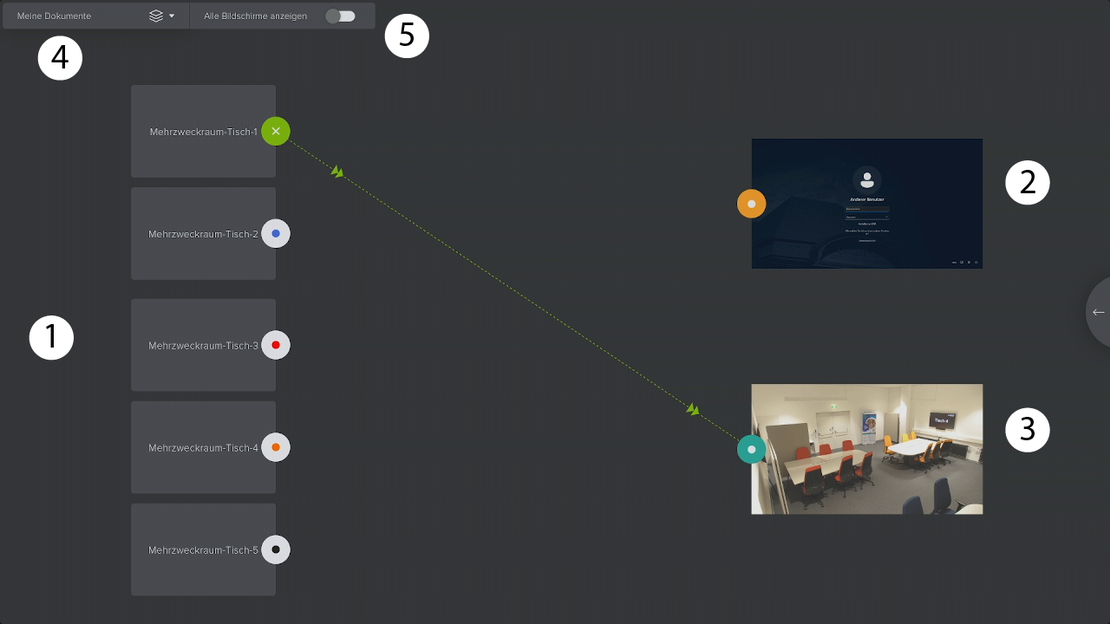
- Gruppenbildschirme
- Hauptmonitor
- Vorschau
- Dokument laden
Alle Bildschirme anzeigen - Bildschirm wird blockiert!
Hauptmonitor (oben) = wird sofort auf dem großen Bildschirm im Raum angezeigt (live).
Vorschau (unten) = erscheint NICHT auf dem großen Raum-Monitor, sondern nur als vorbereitete Ansicht.
Wenn Sie der ganzen Klasse etwas zeigen möchten, immer auf den Hauptmonitor ziehen, nicht auf Vorschau.
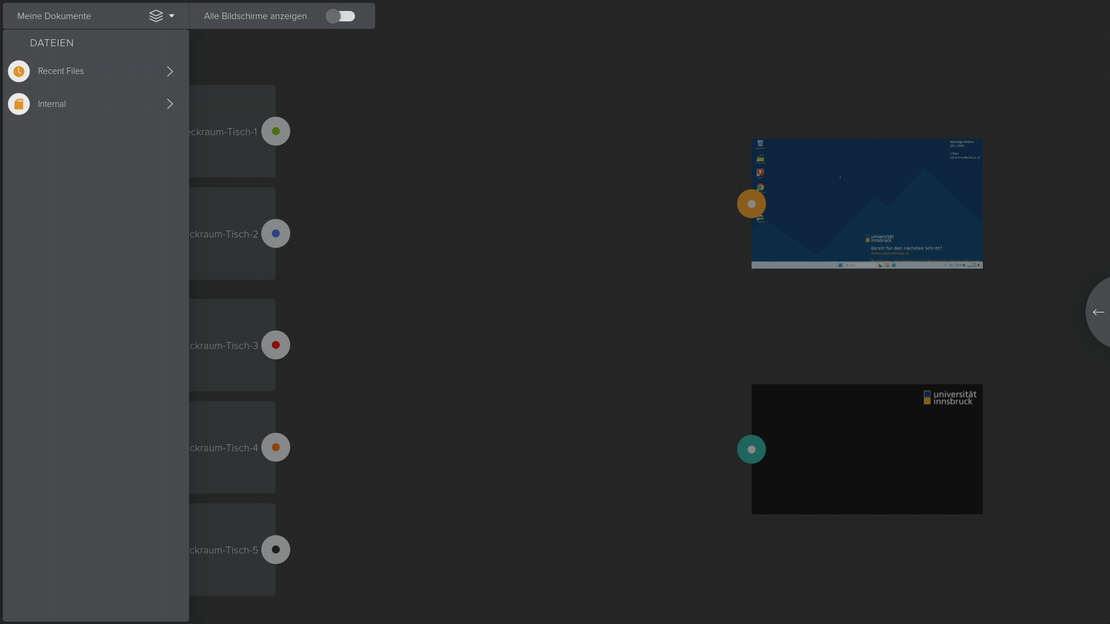
Dokument laden
Sie können ein Dokument per Drag & Drop für eine bestimmte Gruppe freigeben.

Meine Dokumente Menu
Meine Dokumente Menu
Dokument laden
Dokument laden
Bildschirme mit einer oder meheren Gruppen teilen
Bildschirme mit einer oder mehrere Gruppen teilen
Gruppenbildschirm mit anderen Gruppen teilen
- Startpunkt wählen (rechts beim Hauptmonitor oder Vorschau)
- Rechts auf der Seite sehen Sie zwei Monitore: Hauptmonitor (live) und Vorschau (vorbereitet).
- Wählen Sie dort den Verknüpfungspunkt (oranger oder blauer Punkt) am Dokument oder der angezeigte Quelle.
- Verknüpfungspunkt gedrückt halten
- Tippen Sie auf den Punkt und halten Sie ihn mit dem Finger gedrückt.
- Ziehen zum gewünschten Breakout Room
- Ziehen Sie den gehaltenen Punkt nach links – direkt zum Verknüpfungspunkt des gewünschten Breakout-Room-Monitors.
- Loslassen
- Lassen Sie den Punkt auf dem Zielmonitor los.
- Das Dokument wird nur in diesem einzelnen Breakout Room angezeigt.
Gruppenbildschirme auf unseren Bildschirmen anzeigen
Gruppenbildschirme auf unseren Bildschirmen anzeigen
Gruppenbildschirme auf unseren Bildschirmen anzeigen
- Startpunkt wählen (links beim gewünschten Breakout Room)
- Wählen Sie beim Monitor des entsprechenden Breakout Rooms den Verknüpfungspunkt aus.
- Verknüpfungspunkt gedrückt halten
- Punkt antippen und gedrückt halten.
- Ziehen nach rechts – zu Hauptmonitor oder Vorschau
- Ziehen Sie den Punkt nach rechts – entweder zum Hauptmonitor oder zur Vorschau.
Gruppenbildschirm mit anderen Gruppen teilen
Gruppenbildschirm mit anderen Gruppen teilen
Gruppenbildschirm mit anderen Gruppen teilen
- Sie können Inhalte aus einer der Gruppen per Drag & Drop auf den Hauptmonitor ziehen, um sie für alle sichtbar zu machen.
- Sie können die Inhalte auch per Drag & Drop auf Ihren Vorschau-Monitor ziehen und von dort aus ebenfalls per Drag & Drop nur für bestimmte Gruppen freigeben.
Weitere Informationen


