
Tips for using Mastodon
Signed up to Mastodon – what next?
Compared to other social networks, Mastodon requires a little more initiative from users at the start. As it is a non-profit platform, there is no algorithm to suggest profiles or encourage new users to stay. That’s why it’s important to have a look around at the beginning and build up your network in a targeted way.
The following tips will help you improve your experience on Mastodon, so that ‘toting’ is actually fun.

Mastodon's mascot is this cute mammoth.
Hang on a minute, what’s a ‘toot’?
The mastodon is a subspecies of the mammoth – and so the mascot of the social network Mastodon is a friendly, smiling mammoth. The term ‘toot’ has become established for sending a post.
1. Fill in your profile
As a very first step, we recommend that you complete your profile. To do this, start by clicking on ‘Settings’. In the desktop view, this button is located in the right-hand column. On a smartphone, you’ll first need to tap the three horizontal lines to find the ‘Settings’ button.


Next, click on ‘Public Profile’ on the left. There, you can now enter various details, such as a short description, change your display name, add a picture and much more.
If you have your own website, you can add it as a verified link. This will then be displayed with a green background. To do this, click on the ‘Verification’ tab at the top:

Tip: Fill in your profile and post 1–2 updates before you start following other profiles yourself. This increases the likelihood that they will follow you back straight away.
2. Install an app
To use Mastodon on your smartphone, it is advisable to install an app. There is an official app from the Mastodon project, as well as numerous others.
You can find an overview at Mastodon apps.
3. Writing posts
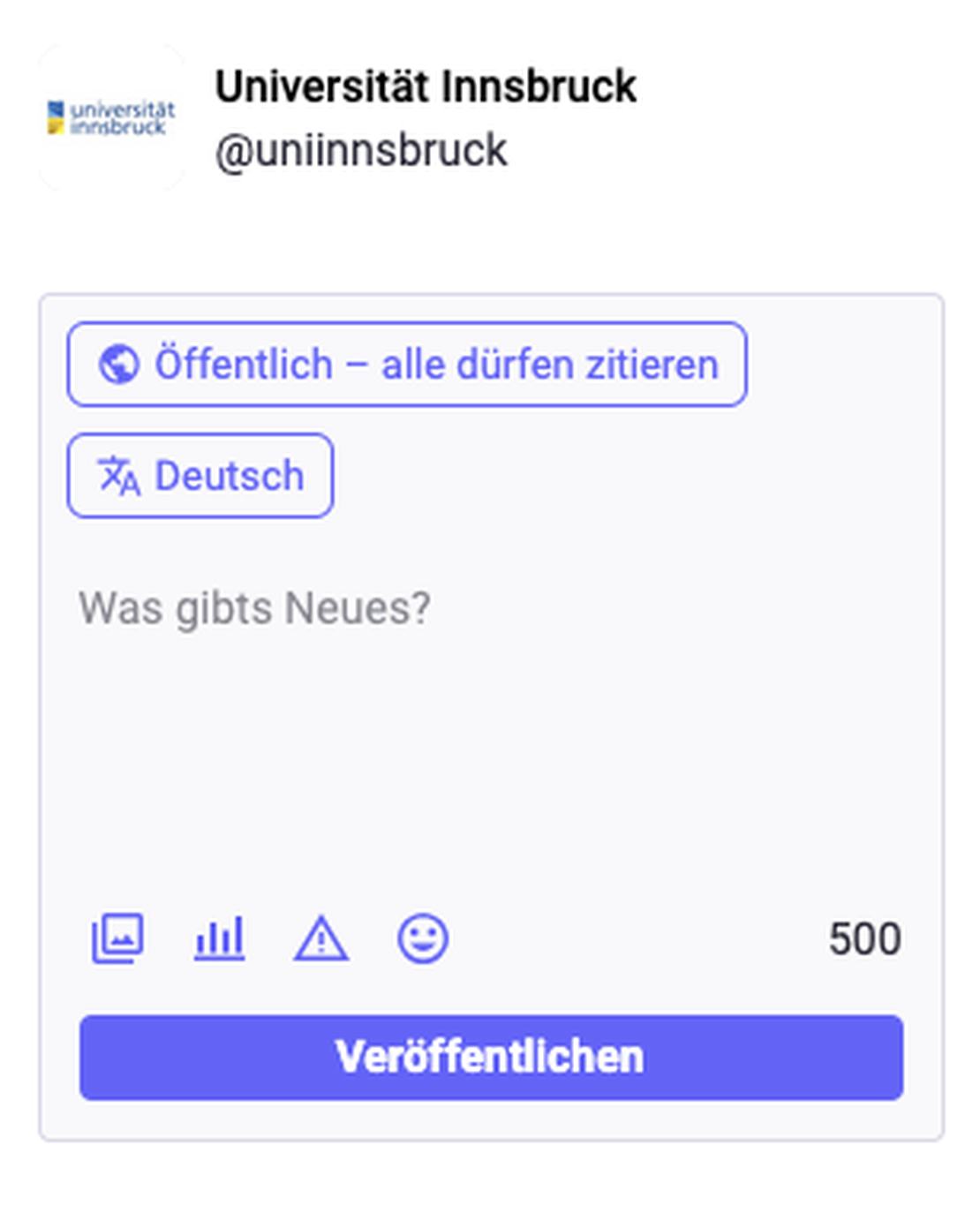
In the top left-hand corner, you will find the field for creating a new post.
For each post, you can adjust the visibility and citation settings. To do this, click on ‘Public – anyone may cite’. This will bring up the ‘Visibility and Citations’ window, where you can choose from several options:


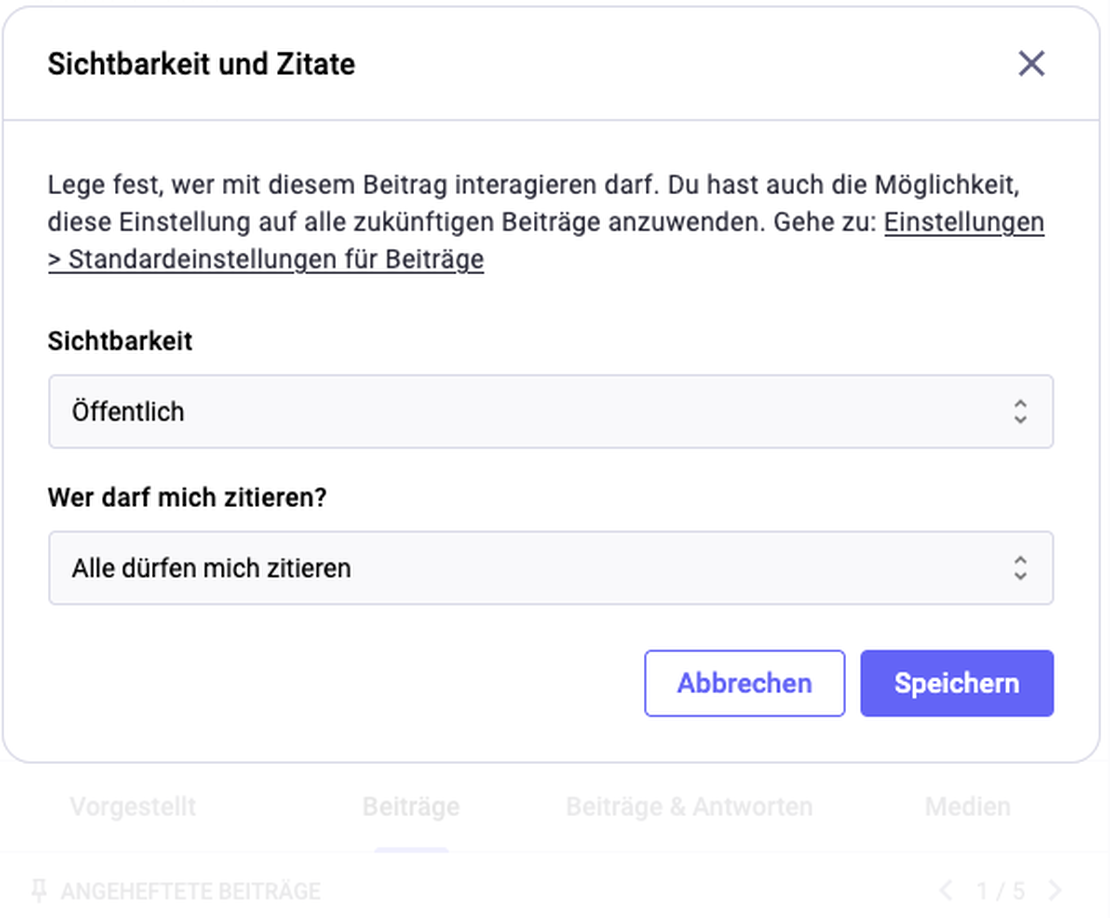
a) Visibility settings:
- Public – default setting: Anyone inside or outside Mastodon can see it.
- Public (quiet): Is promoted less widely; for example, it does not appear in ‘Trending’.
- Followers only: Only followers can see the post.
- Private mention: Functions as a private message on Mastodon. Only those profiles you tag with @ can see the post.
b) Quotability settings:
- Anyone may quote me: Anyone in the Fediverse may quote the post, i.e. add their own comment and share it
- Only my followers may quote me
- Nobody may quote me
You can also set the language of the post and, if you wish, add animage,polls, a content warning(warning sign icon) or emojis. If you include a link, the posted message will display a link preview.
Otherwise, there isn’t really much else to bear in mind when writing your own posts. A few tips:
- Maximum 500 characters: The maximum number of characters per post varies from instance to instance. On the University of Innsbruck’s instances, the limit is 500.
- Use hashtags: As there is no algorithm on Mastodon, hashtags play an important role in getting your posts seen by people who are interested in them.
- Be concise: Those who formulate their messages clearly and get straight to the point tend to have an advantage. On social media, less is often more.
Tip: Add the hashtag #neuhierto your first post – you’ll usually receive a few friendly welcome messages and your first followers.
4. Fill your feed with interesting content
Once you’ve registered, nothing will happen in your feed straight away, as you aren’t following anyone (with the exception of the University of Innsbruck’s account – you’ll be automatically added as a follower there).
To fill your feed, you can follow interesting accounts, hashtags, bots or groups.
4.1 Follow accounts
Here are two tips for finding interesting people, organisations and so on to follow:
Use starter packs
These are bundles of accounts on various topics that you can follow all at once with a single click. On The ‘Fedidevs’ website, you can search for starter packs relating to your area of interest.
We definitely recommend this starter pack containing accounts from our two university servers(which includes colleagues, students and organisational units from the University of Innsbruck who are active on Mastodon).
A list of existing starter packs on academic topics can be found below (expand to view):
Searching with hashtags
Enter a term in the search box (e.g. ‘ecology’ or ‘Ökologie’ – it’s usually worth trying both German and English), then press Enter and click on ‘Hashtags’. Now select one of the hashtags and scroll through the posts using that hashtag. If you come across any interesting posts, take a look at the account behind them and discover interesting people or organisations. As well as research fields, it’s also worth searching for regional hashtags, such as #tirol or #innsbruck.
4.2 Following hashtags
On Mastodon, you can follow not only individual accounts but also specific hashtags. Would you like to read all posts that include the hashtag #innsbruck? If so, you can type ‘innsbruck’ into the search bar, click the ‘Hashtags’ button and then click on the hashtag of your choice. The ‘Follow hashtag’ field will now appear.
Tip: Follow the hashtags for your academic discipline(s) in German and English, and any relevant sub-disciplines too. For example:#Physik, #physics, #Astrophysik and#astrophysics.
4.3 Follow the SciHype bot
The Fediverse team at the University of Innsbruck has set up an account that automatically reposts popular posts from the Fediverse – the SciHype Bot. If you follow this bot, you’ll see all these posts in your own feed.
- The advantage: your homepage will soon be buzzing with activity.
- The downside: depending on your preferences, you might see TOO many posts and it might feel like you’re being ‘spammed’.
- The compromise: Follow SciHype, create a separate list for it (see point 7) and then hide the list from your home page. That way, you can view SciHype’s posts specifically, but they won’t appear in your home page feed.
4.4 Following groups
Another feature of Mastodon is groups. This feature is similar to hashtags and bots. In short: you follow a group’s account. The group then reposts all posts tagged with @groupname. One example is the group @linguisticsfedigroups.social . Any post containing @linguistics is reposted by the group. You can find a list of groups at, for example, on this website.
5. Becoming visible
In some respects, Mastodon works differently from ‘traditional’ social networks. For example, there is no automated algorithm that promotes particularly popular content. Nevertheless, there are a few things you can do to reach more people and encourage interaction.
5.1 Adjust visibility settings
Under ‘Settings’ >> ‘Privacy and Reach’, you’ll find a number of settings that allow you to control the visibility of your posts.
If it is important to you – for example, as an institution – to build a wide reach and be found by as many people as possible, you shouldtick all the boxes here. As a private individual, it is of course a matter of personal judgement which settings you choose.
5.2 Using hashtags
Hashtags play an extremely important role on Mastodon. As there is no automated algorithm, hashtags are the most important way for users to find the posts that interest them. As mentioned above, you can also follow hashtags.
So: make sure you use hashtags when you post on Mastodon!
Here are three more tips:
- Keep them general: Hashtags should generally not be too specific. Otherwise, the chance that others are also using or have subscribed to these hashtags is very low. For example, the hashtag #Literature makes more sense than #BrennerArchive.
- Mention subjects: In an academic context, it usually makes sense to include the discipline and sub-discipline as hashtags – such as #Physics and #QuantumPhysics. Depending on the field and language of the post, you can add hashtags in German, English or both languages. For in-person events, local tags are useful, e.g. #Tyrol and #Innsbruck.
- Placehashtags at the end: Ideally, you should place the hashtags right at the end of your post. This makes it easier for people who use screen readers.

Tip: Find out which hashtags are already being used to tag specific topics: simply enter a relevant word (e.g. ‘astrophysics’) into the search bar at the top left. You will then see a list of similar hashtags that have already been used. You’ll also be shown how often these hashtags have been used in recent days.
Scroll through the suggested posts and see which hashtags they use. Then enter these hashtags into the search bar. This way, you can quickly find popular hashtags in your field.
5.3 Tagging the people involved
As with other social networks, you can tag other accounts on Mastodon using the @ symbol. But please note: on Mastodon, you must specify both the username and the instance, for example: @uniinnsbruck@social.uibk.ac.at
The structure is therefore similar to an email address. Include this full address in a post if you want to tag a specific account. Not sure which instance the account is on? Then you can go to their profile page. Clicking on the address brings up a field where you can copy it:

5.4 Tailoring content to the target audience
In this respect, Mastodon is no different from other platforms. Content should be tailored to the platform and the target audience. For example: The University of Innsbruck’s Mastodon account primarily has followers who are not from Innsbruck. Consequently, we rarely post event invitations (or, if we do, only those that are also accessible online).
It’s worth getting to know Mastodon as a platform to understand what works and what doesn’t. Be active, follow others, read what’s being posted, and post your own content.
If you’re using Mastodon to promote an institute or project, you should familiarise yourself a little with the relevant ‘bubble’ on Mastodon:
- Look for relevant accounts and hashtags.
- Network with relevant institutions and researchers
- Boost posts from the relevant field
On Mastodon, active networking is even more important than on other platforms, as there is no automated algorithm to push your posts into the right niche.
6. Observe Mastodon etiquette
Each Mastodon instance can set its own code of conduct. In the event of breaches of these rules, the instance’s administrators may ban individual users or even entire other instances.
Some examples:
- the rules laid down by the university’s own body for staff members
- the rules laid down by the university’s student body
- the rules of one of the largest servers, Mastodon.Social
Generally speaking, the following is considered ‘good practice’ across much of Mastodon:
- Adding ALT text to images for blind and visually impaired users (click on ‘ALT’ after uploading an image)
- Labelling potentially distressing content with a content warning (click on the warning icon when creating a post)
- Labelling images created using AI.
Tip: Do you like a post? Then why not ‘boost’ or ‘repost’ it! Reposting is particularly important on Mastodon, as it helps posts that are especially interesting reach a wider audience. On Mastodon, deliberate reposting replaces the automated algorithm.
7. Creating lists
Lists allow you to group the accounts you follow. This is useful, for example, if you follow several different topics. You can also use them to move accounts that post too frequently for your liking and seem to be ‘spamming’ your home page.
To create a list, simply click on ‘Lists’ in the right-hand sidebar and then on the plus icon at the top:

You can then choose whether or not you want to hide the members of the list on the home page.