
TUTORIAL
on the Internship and Job Portal of the University of Innsbruck
1. General Information and Guidelines on the Publication of Internships and Job Advertisements
a) Publication of Advertisements
When publishing an advertisement on the Internship and Job Portal of the University of Innsbruck, you can choose between two options: publishing internships free of charge or post job advertisement for a fee.
- Free publication of an advert for up to 12 months (duration).
- No restriction regarding sectors or occupational groups.
- The publication of internships does NOT include trainee positions/programmes
- The prerequisite for publication is that it is a fair and qualified internship (at least Matura level and NOT a completed Master's degree).
- Duration of employment per internship up to max. 6 months.
In 2016, the members of "Career Services Austria" agreed on the following requirements for the placement of internships at 10 universities in Austria:
- A written contract as documentation of the legal relationship
- Appropriate compensation or payment (explicitly compliant with the requirements of the Wage and Social Dumping Prevention Act in its current version)
- A dedicated contact person in the company who also provides feedback
- Issuance of a qualified reference upon completion of the internship
- Job postings must require a current or completed degree at a university or university of applied sciences
- The publication duration can be chosen by you. You also have the option to republish job offers after the booked period expires.
- Please refer to our ›current offer for prices.
When creating new job advertisements, the system distinguishes between
Job advertisements in the draft stage are labelled "Entwurf". Your advertisement is saved, but no credit is deducted and the posting is not publicly visible.
Job advertisements that have been withdrawn prematurely or whose puplication duration has expired are labelled "Beendet". No refund of credit is possible for job advertisements that have been withdrawn prematurely. These job advertisements are no longer published.
Expired job advertisements can be reused as templates for new job advertisements. To do so, click on "Anzeige bearbeiten" and select "Anzeige kopieren" at the end of the form. Update the period of publication ("veröffentlicht von"; "veröffentlicht bis") in the copied version and review all other entries for validity. Complete the process by clicking "Änderungen übernehmen".
Currently published advertisements are labelled with "veröffentlicht von" and "veröffentlicht bis".
Our General Terms and Conditions apply.
All information on data protection in accordance with Art. 12-14 GDPR can be found at https://www.uibk.ac.at/datenschutz/ and https://www.uibk.ac.at/de/relationshipmanagement/datenschutz/.
NOTE ON SALARY DISCLOSURE: Since March 1, 2011, it has been mandatory to provide information on the minimum salary in job advertisements. This obligation applies to employers, private employment agencies and legal entities under public law entrusted with job placement. The applicable collective agreement defines the scope of positions concerned and the corresponding minimum pay. The job advertisement must state the minimum wage applicable to the advertised job in accordance with the collective agreement or as stipulated by law or other standards of collective legal organisation. This information must be given in terms of amount, stating the time unit of hour/week/month, without pro rata special payments, including personal allowances that are already known at the time of the advertisement. The employer may indicate in the job advertisement that it is prepared to overpay in accordance with the collective agreement. Further information can be found at "Websites of the WKO. Unfortunately, the regulations for internships are not clear. However, the University of Innsbruck stands for fair and qualified internships, which is why only such internships can be published free of charge. We therefore ask you to pay attention to the salary information when publishing internship positions.
b) Use of Credits
Job postings are purchased using credits.
One credit = publication of one job posting for 30 days
Two credits = publication of one job posting for 60 days or two separate job postings for 30 days each, and so on.
You can purchase and redeem credits at any time. However, credits that have already been purchased are non-refundable.
Please refer to our current offer for pricing information.
c) Industries and occupational fields
A sector and an occupational field can be assigned to each job advert. While the industry refers to the company, the occupational field is primarily relevant for the jobseeker (e.g. industry of the company: architecture and construction, occupational field in which a job is advertised: Office, marketing, finance, law, security). In this way, the job search can be filtered specifically by occupational field and sector.
The sectors were created on the basis of Business directory.
The occupational fields were created on the basis of the former qualifications barometer of AMS Austria (currently Career information system ).
- Architecture and construction
- Automotive and vehicle construction
- Banking and financial services
- Advice and consulting
- Embassies and honorary consulates
- Energy, water and environment
- Education and training
- Animal feed and pet supplies
- Health and social services
- Craft trades
- Higher education (universities, universities of applied sciences)
- Real estate
- Industry and mechanical engineering
- Internet and information technology
- Chambers and associations
- Consumer goods and trade
- Art, culture and sport
- Marketing, PR and design
- Media and publishing houses
- Public service
- Personnel services
- Pharmaceuticals, chemicals and medical technology
- Politics
- Student organisations
- Telecommunications
- Veterinarians
- Animal photography
- Animal care and support
- Animal schools and psychology
- Tourism, travel and catering
- Transport and logistics
- Clubs and societies
- Hire and rental
- Insurance companies
- Auditing, taxes and law
- Science and research
- Breeding
- Construction, ancillary building trades, wood, building technology
- Mining, raw materials, glass, ceramics, stone
- Office, marketing, finance, law, security
- Chemistry, biotechnology, food, plastics
- Electrical engineering, electronics, telecommunications, IT
- Trade, logistics, transport
- Agriculture, horticulture, forestry
- Mechanical engineering, automotive, metal
- Media, graphics, design, printing, art, handicrafts
- Social services, health, beauty care
- Textiles, clothing, fashion, leather
- Tourism, catering, leisure
- Environment
- Science, education, research and development
2. Registration for New Customers
NOTE on using the tutorial
- Additional visual explanations in the form of screenshots are marked with "»".
Click the magnifying glass in the lower-right corner of an image to enlarge it. The image title will be displayed in the bottom-left of the enlarged view. - Expandable sections or links are marked with "›" before the link.
a) Creating an account
In order to log in to the internship and job portal, you need your own University of Innsbruck user ID. By selecting the quick link ›Apply for an account you will be guided through three steps:


Once your data has been saved, you’ll receive an » e-mail with an activation link ("Aktivierungslink").
For security reasons, this link is only valid for 24 hours. Clicking the activation link will create your account.
You’ll receive a » username and an » info/confirmation mail. Use your username and password to log in from now on.


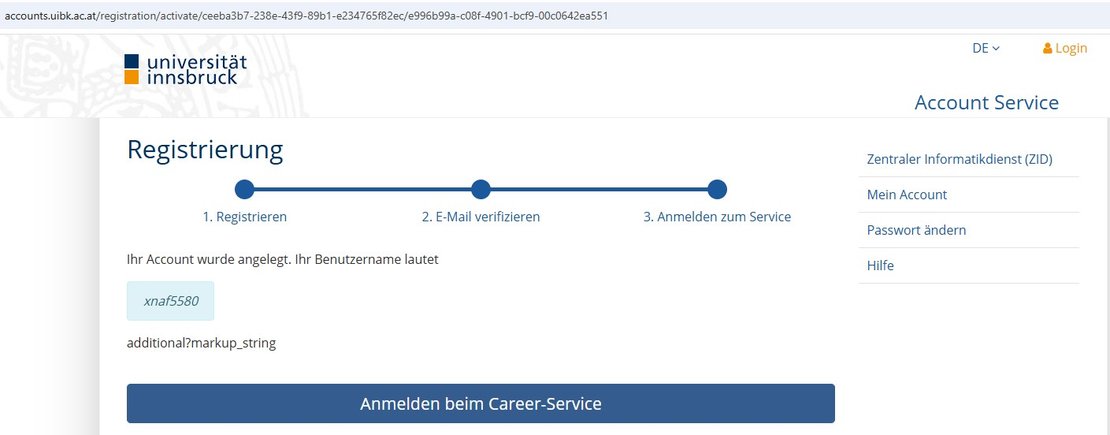


After clicking on the button » "Signup to the Career Service" you will be redirected to the » "Web Single Sign-on - Login Window of the University of Innsbruck". There, log in using your username and the password you previously chose. You will then be directed to the » Contact form. Under "Akademische Grade" you can enter your academic titles by using the standard selection provided. If you check the box labeled "Kontakt öffentlich anzeigen", your contact details will appear in the online job posting. For administrative purposes, the University requires the relevant contact person at your employer. Make sure all fields are filled in and confirm your entry using the "Änderungen übernehmen" button to continue.


Start your registration here:
Please note that only one registration is possible per contact person and only one employer profile can be assigned at a time. However, once registration is complete, you can add several contact persons to your employer profile, each of whom will then receive their own user ID. To do this, please contact us by email, stating your name, user ID and the employer profile concerned: career-service@uibk.ac.at
Please do not forget to consult with the contact persons already registered at your company in order to avoid misunderstandings during the ordering process or when placing the job adverts.
Please keep your username and password in a safe place, as automatic password reset is not available.
If you forget your login credentials, please contact us in writing by e-mail at career-service@uibk.ac.at (see also "FAQ").
- Anrede (Salutation)
- Vorname (First name)
- Nachname (Surname)
- Organisation (Organisation)
- Geschäfts-E-Mail-Adresse (Business Email address)
- Neues Passwort (New password)
- Wiederholung des Passworts (Repeat password)
- Kenntnisnahme der Datenschutzerklärung (Acknowledgement of the privacy policy)
- Anrede (Salutation): Herr/Frau/keine Angabe
- Vorname (First name)
- Nachname (Surname)
- Akademischer Grad vor- und nachgestellt (Standardauswahl) (Academic degree (default selection))
- Persönliche geschäftliche E-Mail-Adresse (Personal business email address)
- Telefonnummer(Phone number)
- Auswahl, ob die Kontaktdaten der Ansprechperson öffentlich angezeigt werden sollen (Option to display the contact person's information publicly)
- Bestätigung, dass es sich um Kontaktdaten einer natürlichen Person handelt (Confirmation that the contact details belong to a natural person)
- Bestätigung der Datenschutzerklärung (Confirmation of the privacy policy)
b) Creating an Employer Profile
After logging in to the portal with your University user ID and filling out the contact form, you’ll be able to create an » employer profile that will be linked to your user ID. Please ensure that the company name is entered exactly as listed in the commercial register, association register or equivalent and include the VAT number (UID). This helps streamline our invoicing process and prevents unnecessary follow-up.
This field sets the ending of the web address where your employer profile will appear. Enter only a short name, not a full URL. Use hyphens to separate words (e.g., Career-Service).
Companies are asked to confirm here that they are registered in the commercial register.
Associations should leave this box unchecked; in that case, the "UID Nummer" field does not need to be completed.
The email address entered here will be displayed publicly along with your company or association name and contact details in your employer profile. However, you also have the option to add non-public contact persons within your profile.
You can upload your organisations logo here, which will be displayed in both your employer profile and your job postings.
Use these sections to publish a brief description of your employer profile and upload promotional images.
Please select the Sustainable Development Goals (SDGs), as defined by the United Nations, that your organization officially pursues.
Inthe Service portal for employers under "Social Mission - Diversity - Sustainability" you will find the requirements for being classified as a social, humanitarian, or charitable employer (NGO/NPO) as well as a link to the applicable special conditions.
- Firmenname (Company name)
- Firmenwortlaut (exakter Firmenwortlaut laut Handelsregister) (exact company name according to the commercial register)
- Kurzname für URL (Short name for URL)
- Branchen (Industries)
- UID-Nummer (VAT-Nummer (Value Added Tax Identification Number))
- Auswahl, ob die Firma im Handelsregister eingetragen ist (Option to confirm if the company is registered in the commercial register)
- Straße (Street Name)
- Hausnummer (House number)
- Adresszusatz (Address suffix)
- Postleitzahl (Postcode)
- Ort (City)
- Land (Country)
- Öffentliche E-Mail-Adresse (Public email address)
- E-Mail-Adresse für Rechnungen (Email address for invoices)
- Firmenwebsite (Vollständige URL, z.B. https://www.meine.firma.xyz) (Company website (full URL, e.g. https://www.meine.firma.xyz))
- Telefonnummer (Phone number)
- Company logo
- Über uns (About us)
- Nachhaltigkeitsziele (Sustainability goals)
- Gemeinnützige Organsiation (Non-profit organisation)
- Bild hinzufügen (Add image)
- Datenschutzerklärung akzeptieren (Accept privacy policy)


3. Login for Registered Users
NOTE on using the tutorial
- Additional visual explanations in the form of screenshots are marked with "»".
Click the magnifying glass in the lower-right corner of an image to enlarge it. The image title will be displayed in the bottom-left of the enlarged view. - Expandable sections or links are marked with "›" before the link.
Log in to Your Existing Account
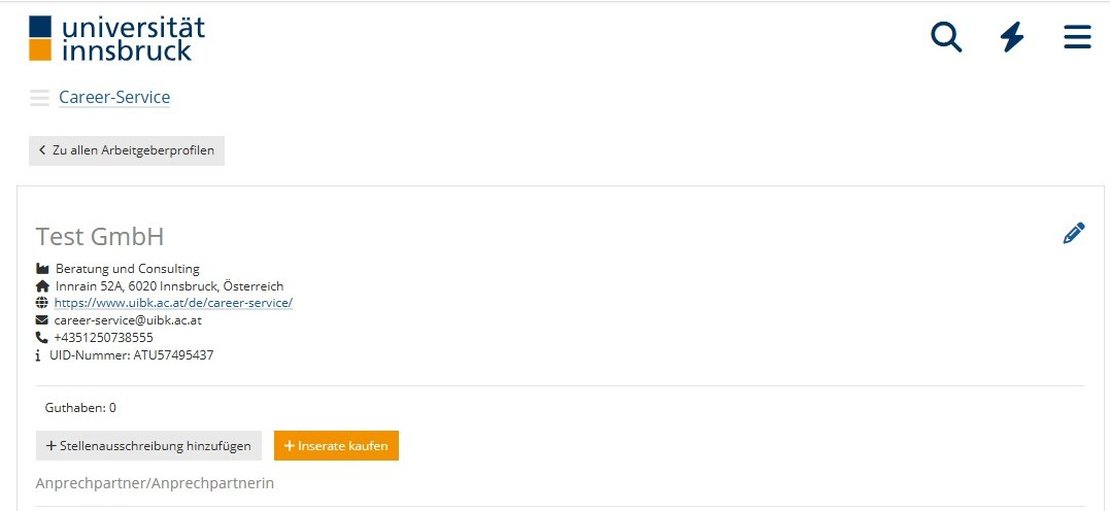
To access your existing »employer profile please follow these steps:
- Click on the ›Web Single Sign-on - Login window of the University of Innsbruck.
Please enter your userneme and password in this form. - You will then be redirected to your personal »contact form.
Here, you can update your personal information (e.g. whether to display your contact publicly) or confirm the existing data by clicking the "Änderungen übertnehmen" button.
Please make sure to confirm the form by clicking this button, even if no changes are made.

4. Ordering
NOTE on using the tutorial
- Additional visual explanations in the form of screenshots are marked with "»".
Click the magnifying glass in the lower-right corner of an image to enlarge it. The image title will be displayed in the bottom-left of the enlarged view. - Expandable sections or links are marked with "›" before the link.
All orders must be placed through your employer profile by clicking on the button"Inserate kaufen" right next to "Stellenausschreibung hinzufügen".
A »pop-up window will appear. Enter the desired number of paid job postings in the "Stellenanzeigen kostenpflichtig buchen" field and accept the ›General Terms and Conditions to complete the order process by clicking on "Zahlungspflichtig kaufen".


Once booked, job postings are available for immediate use. You can publish your listings without any additional approval. Billing takes place afterward by invoice.
Please refer to our › current offer for prices.
FAQ - FREQUENTLY ASKED QUESTIONS
Please contact us by email at Career-Service@uibk.ac.at and provide us with either your e-mail address you used to register or, if available, your user ID. If needed, we will email you your user ID by e-mail or initiate a password reset. In the case of a password reset, you will receive an email from the University of Innsbruck’s Information Technology Services with further instructions.
- Please create an account using the following link: https://accounts.uibk.ac.at/registration/service/careerservice
Once your account request is submitted, you’ll receive your user ID by email. - Please enter your details in our contact form, confirm the information, and make sure to click "Änderungen übernehmen" — even if the existing entries are correct.
- Please send your user ID to Career-Service@uibk.ac.at.
- We’ll then link your ID to your company profile and you’ll be able to publish job postings right away.
Please send us a brief message to Career-Service@uibk.ac.at and will remove your email address from our mailing list. Please note that system-related messages (e.g. confirmation emails when booking job ads) will still be sent, but you will no longer receive updates about special offers or new features in the system.
To delete your account, simply send us an email at Career-Service@uibk.ac.at. Please note that any remaining credit will expire with the cancellation.
When you purchase job advertisements (via the "Inserate kaufen" button), you will be billed retrospectively by invoice. However, the credit will be available to you immediately after booking, so you can publish your job advertisements straight away.