Universitäts-Sportinstitut der Universität Innsbruck
Das Universitäts-Sportinstitut (USI) steht als Dienstleistungseinrichtung der Universität Innsbruck mit seinem Angebot von etwa 1.000 Sportkursen je Studienjahr den Studierenden sowie den Mitarbeiter*innen der Universitäten, der Pädagogischen Hochschulen, der Fachhochschulen und der Privatuniversitäten des Universitätsstandortes für sportliche Tätigkeiten und Wettkämpfe zur Verfügung. Die Kurse können bei freien Kapazitäten auch von allen anderen Sportbegeisterten gebucht werden.
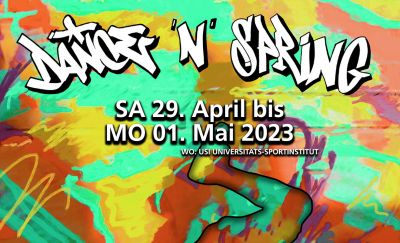
DANCE 'N' SPRING - Tanzfestival 2024
DANCE 'N' SPRING - Tanzen & Springen - Tanzen im Frühling
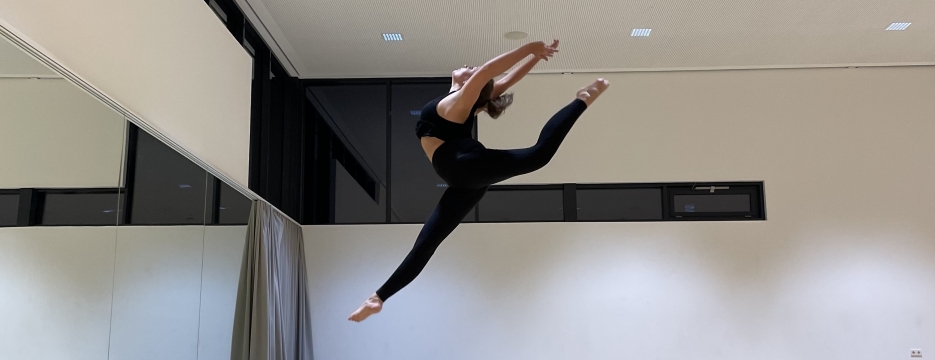
Interessierten Tänzer:innen wird die Möglichkeit geboten, Tanz zu lernen, sich tänzerisch weiterzuentwickeln und sich von national und international erfolgreichen Choreograf:innen inspirieren zu lassen. 15 Workshops ("open level" = für Anfänger:innen und auch fortgeschrittenen Tänzer:innen oder "level" classes) werden die Tanzsäale am USI Innsbruck an diesem Wochenende zum Beben bringen.
Mit dem Festivalpass hast du Zugang zu allen Workshops.
key facts
Sa 27. und So 28. April 2024
Beginn 1. Workshop: 10 Uhr
Ende: ca. 20 Uhr
Open Level, Level
Halle 02 (Hauptgebäude) bzw. Halle 50 (Pulverturm)
Mit dem Festivalpass hast du Zugang zu allen Workshops.
Inhalte:
Details

USI Avalanches Tiroler Cup Sieger 2024
Das Herren Volleyballteam der USI Avalanches gewinnt ein packendes und hochklassiges Finale im Tiroler HALI Cup in der Innsbrucker USI Halle gegen das HYPO TIROL Volleyballteam 2 nach 0:2 Satzrückstand noch mit 3:2 (-23, -22, 12, 20, 13) und kürt sich damit zum dritten Mal in Serie zum Tiroler Cupsieger. Den Titel bei den Damen konnte sich das Team der Ti-Volley sichern.

SS 24 - Programm, Termine, Anmeldung
Das Sommersemester 2024 nähert sich mit großen Schritten. Das Universitäts-Sportinstitut (USI) plant ein buntes Programm aus Kursen, Workshops, Events, uvm.
Blick ins Kursprogramm:
Kursprogramm
Wichtige Termine im SS 24:
Anmeldebeginn:
Montag 26.02.2024 ab 08.00 Uhr (für Studierende, Mitarbeiter*innen, Absolvent*innen)
Mittwoch 28.02.2024 ab 08.00 Uhr (für Externe)
Kursbeginn:
Montag 04.03.2024
Details

Aktuelle Informationen zu Tennis & Padel am USI Innsbruck
Die Freiluftsaison steht in den Startlöchern!
Ab sofort sind - sofern es die Witterung zulässt - die Sand- sowie Teppichplätze und unser im Herbst 2023 eröffneter Padelcourt wieder geöffnet und bespielbar.
Für Fragen zum Status der Bespielbarkeit der Tennisanlage steht unser Portier telefonisch zur Verfügung.
Kontakt:
Details

USI Weihnachtsgeschenk - Am Weg. Fotovortrag von Stefan Voitl
Ein Weihnachts-Geschenk der besonderen Art gab es am gestrigen 13. Dezember für alle gespannten Zuhörer:innen im - bis auf den allerletzten Sitzplatz voll gefüllten - Hörsaal 1.
In einem emotionalen Fotovortrag nahm Stefan Voitl - leidenschaftlicher Bergmensch, Fotograf und Geschichtenerzähler par excellence - das Publikum mit auf seine Reisen in den Himalaya, bei denen er an der Seite der MTB-Profis Tom Öhler und Harald Philipp bzw. der Ausnahmebergsteiger Conrad Anker und David Lama das Land, die Kultur, die sportliche Herausforderung und nicht zuletzt sich selbst besser kennenlernte.
Erzählungen von Erlebnissen mit inspirierenden Persönlichkeiten, der inneren Rastlosigkeit, der "Liebe auf den 3. Blick" und jeder Menge Humor machten diesen "Kinoabend" zu einem eindrücklichen Erlebnis.
Das USI wünscht allen Kursteilnehmer:innen fröhliche Feiertage und einen guten Rutsch ins neue Jahr!

USI - Ausgezeichneter Tiroler Lehrbetrieb 2024-2026
Auf Vorschlag einer Jury aus Vertreter:innen der Landesregierung, der Kammer für Arbeiter und Angestellte für Tirol und der Wirtschaftskammer Tirol wurde das Prädikat "Ausgezeichneter Tiroler Lehrbetrieb 2024 bis 2026" an die Leopold-Franzens-Universität Innsbruck, Universitäts-Sportinstitut Innsbruck / USI durch das Land Tirol verliehen.
Das diplomierte Lehrlingsausbildner-Team des USI betreut und begleitet derzeit zwei Lehrlinge auf ihrem Weg zum Sportadministrator.
Ansprechperson und Koordinator für Praktika und Lehrstellen: Patrick Ruez (Patrick.Ruez@uibk.ac.at).

International Day of University Sport am USI Innsbruck
Im Zuge des jährlichen International Day of University Sport (IDUS) der FISU am 20. September hat sich das USI Innsbruck wieder eine spannende Aktion überlegt!
Im vergangenen Studienjahr wurden laufend alte, gebrauchte und kaputte Sportgeräte und -Gegenstände gesammelt bzw. gerettet. Ein stattliches Sammelsurium an Sportbällen, Reifen, Matten uvm. wird im Sinne eines nachhaltigen Ansatzes professionell verändert, repariert und wieder verwertet.
In Kooperation mit dem Green Office der Universität Innsbruck - welches die Schätze am heutigen 20. Spetember abgeholt hat - und dem gemeinnützigen Verein "Abrakadabra", der Lebenshilfe Innsbruck und dem Aufbauwerk wird das Gesammelte in angeleiteten Workshops am 13. und 14. Oktober 2023 beim "noamol-Festival" up-gecyclet.
Kommt vorbei!
#letsidus
Details
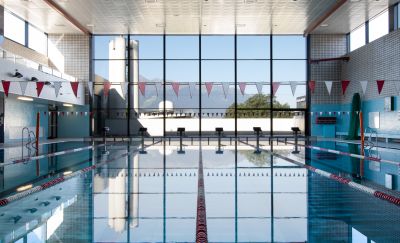
Sport- und Gesundheitsförderung des BR1*DA füralle wissenschaftlichen Mitarbeiter*innen
Deine Gesundheit zählt!
Der Betriebsrat für das wissenschaftliche Personal und Dienststellenausschuss (BR1*DA) hat in seiner Sitzung einstimmig beschlossen, ab sofort allen wissenschaftlichen Mitarbeiter*innen bis zu zweimal jährlich einen Zuschuss zu verschiedenen Sportangeboten zu ermöglichen. Diese Sport- und Gesundheitsförderung bezieht sich auch auf das USI-Kursangebot. Unter Vorlage einer Kopie der USI-Kursbestätigung für das aktuelle SoSe 2022 erhalten wissenschaftliche Mitarbeiter*innen ab sofort € 25,- Förderzuschuss.
Das BR1*DA-Sekretariat befindet sich am Innrain 52d (ehemaliger GEIWI-Turm), 8. Stock, nordost-seitig. Besetzt ist es von Montag bis Freitag zwischen 9.00 und 12.00 Uhr.
Viel Spaß beim Sport wünscht das USI und der Betriebsrat für das wissenschaftliche Personal und Dienststellenausschuss (BR1*DA)!
Details

Bargeldlos
Ab dem 25.02.2019 können alle Bezahlungen am USI Anmeldeschalter nur mehr bargeldlos erfolgen!
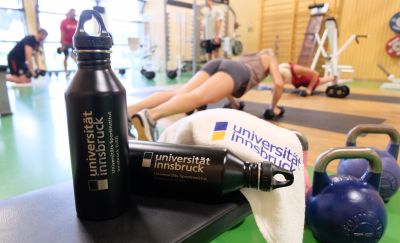
USI Merchandise
Handtücher (in den Farben weiß und blau erhältlich) und
Trinkflasche mit USI Logo
Beim Portier erhältlich!
| Handtuch 50 x 100 | € 15 |
| Handtuch 70 x 140 | € 20 |
| Trinkflasche | € 20 |
| T-Shirt S-XL | € 10 |